
How to Connect Computers Together
To synchronize files between computers you first need to connect the computers together. For this you need a network, either using wires or a wireless network. If your computers are already connected to a network please read sharing folders over the network . Then you can learn how to sync computers using AJC File Sync .
How to connect your computers together if you don't have a network
If you don't have any sort of network yet, then the simplest way to connect your computers is a wired network. Most modern computers already come with a network card already installed. If not you can purchase a network card for very little these days.
|
The network socket on the back of your computer and network cable plug look like this. |


|
|
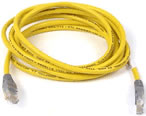
To connect just two computers all you need is a CAT5 "crossover" cable directly connected between your two computer's network sockets. |
|
If you are connecting more than two computers you will need a network hub and normal CAT5 cables between each computer and the hub.
Then you need to make your files accessible over the network
Before you can synchronize files with AJC Sync you need make some folders on the destination computer accessible by sharing folders over the network .